NGINX Notes
What is NGINX?
NGINX is a high-performance web server that is also used as:
It is designed to handle very high traffic efficiently.
Key Features of NGINX
NGINX Use Cases Summary
| Feature | Purpose |
|---|---|
| Reverse Proxy | Forward requests to backend servers |
| Load Balancer | Distribute traffic across multiple servers |
| Caching | Faster response by serving cached content |
| Static Hosting | Serve HTML, images, CSS, and JS files directly |
| API Gateway | Manage and route API traffic |
                ┌──────────────────────┐
                │      Internet        │
                └─────────┬────────────┘
                          │
                  Incoming Requests
                          │
                ┌─────────▼───────────┐
                │   NGINX Server      │
                │ (Reverse Proxy)     │
                └─────────┬───────────┘
        ┌─────────────────┼──────────────────┐
        │                 │                  │
┌───────▼───────┐ ┌───────▼───────┐ ┌──────▼────────┐
│ Web Server 1  │ │ Web Server 2  │ │ Web Server 3  │
│ (App Node)    │ │ (App Node)    │ │ (App Node)    │
└───────────────┘ └───────────────┘ └───────────────┘
        │                 │                  │
        └────────── Response Back ──────────┘
How It Works
- Client sends a request.
- NGINX receives it.
- NGINX decides: serve a static file or forward the request to a backend server.
- The response is returned to the client.
Final Architecture Summary
Client  -->  NGINX  -->  (Cache check)
                            |
                   ┌────────┴────────┐
                   │                 │
             Static Files      Backend Servers
(HTML/CSS/Images) (Node.js, APIs)A forward proxy sits between clients and the internet. The client sends its request to the proxy, and the proxy forwards it to the target server on the client's behalf.
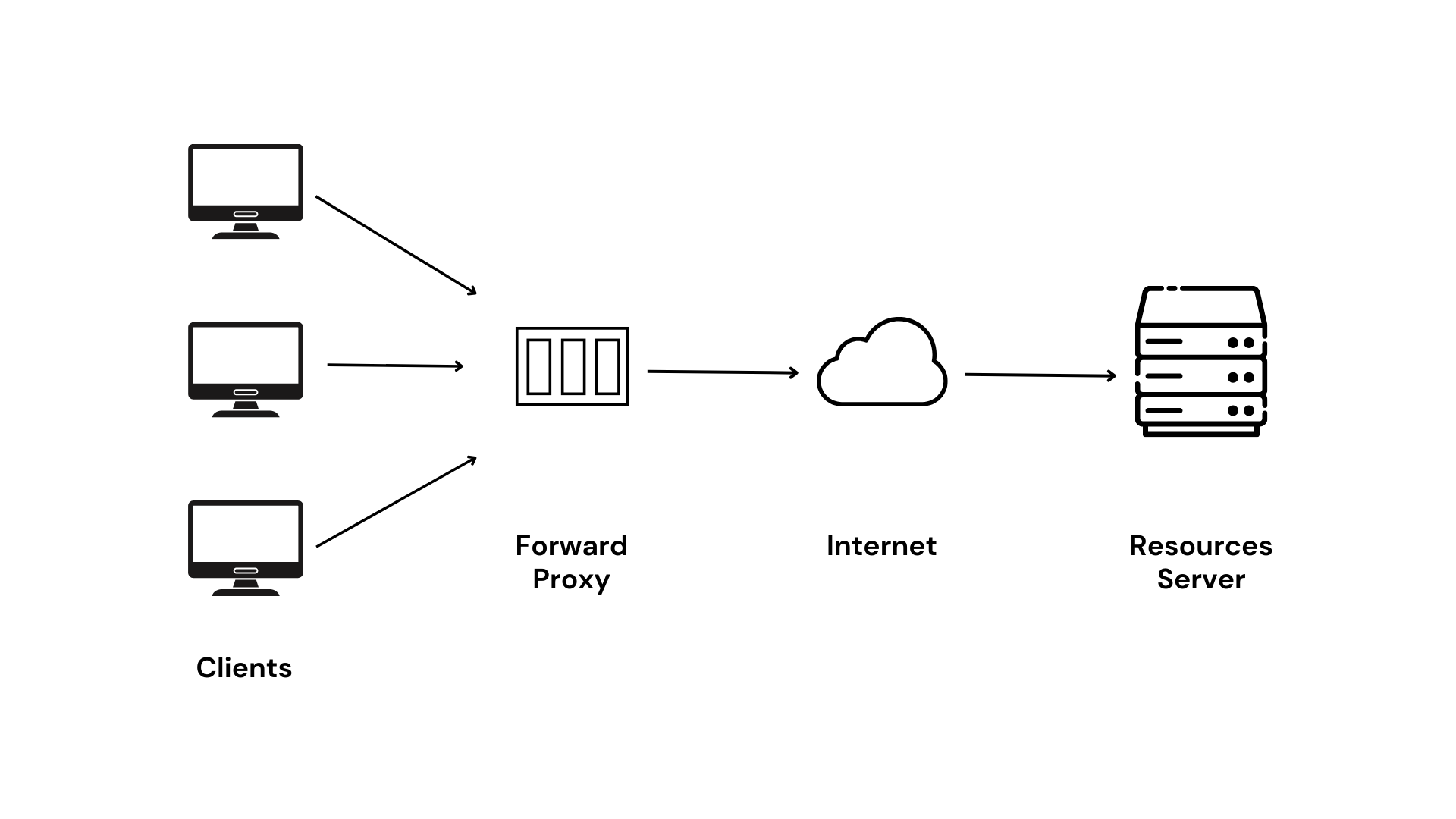
A reverse proxy sits in front of one or more backend servers. The client sends its request to the reverse proxy, and the proxy decides which backend server should handle it.

In production, a reverse proxy rarely talks to just one backend. NGINX can distribute incoming requests across multiple application servers (often called upstream servers). Here's the full picture:
Multi-Server Architecture
         ┌──────────────┐
         │   Clients    │
         │ (Browsers /  │
         │  Mobile Apps)│
         └──────┬───────┘
                │  HTTPS (port 443)
                ▼
        ┌───────────────────┐
        │      NGINX        │
        │  (Reverse Proxy)  │
        │                   │
        │  ┌─────────────┐  │
        │  │  SSL Termin. │  │   ← decrypts HTTPS
        │  └─────────────┘  │
        │  ┌─────────────┐  │
        │  │  Routing     │  │   ← matches location rules
        │  └─────────────┘  │
        │  ┌─────────────┐  │
        │  │  Load Bal.   │  │   ← picks a backend
        │  └─────────────┘  │
        └──┬──────┬──────┬──┘
           │      │      │
     HTTP  │      │      │  HTTP
   :3001   │  :3002│  :3003│
           ▼      ▼      ▼
     ┌─────────┐ ┌─────────┐ ┌─────────┐
     │ App #1  │ │ App #2  │ │ App #3  │
     │ Node.js │ │ Node.js │ │ Node.js │
     └─────────┘ └─────────┘ └─────────┘
How It Works — Step by Step
- Client connects to
https://example.com. - NGINX terminates SSL — decrypts the request so backends don't need to handle HTTPS.
- Location matching — NGINX checks the URL path against its
locationblocks to decide which upstream group handles the request. - Load balancing — NGINX picks one server from the
upstreamgroup using the configured algorithm (round-robin, least connections, etc.). - Proxying — The request is forwarded over plain HTTP to the chosen backend.
- Response — The backend replies to NGINX, which sends the response back to the client over HTTPS.
1. Defining an Upstream Group
The upstream block tells NGINX the addresses of your backend servers:
upstream app_servers {
    server 127.0.0.1:3001;
    server 127.0.0.1:3002;
    server 127.0.0.1:3003;
}2. Connecting location → upstream
server {
    listen 80;
    server_name example.com;

    location / {
        proxy_pass http://app_servers;

        # Forward useful headers to the backend
        proxy_set_header Host              $host;
        proxy_set_header X-Real-IP         $remote_addr;
        proxy_set_header X-Forwarded-For   $proxy_add_x_forwarded_for;
        proxy_set_header X-Forwarded-Proto $scheme;
    }
}X-Real-IP and X-Forwarded-For, your app can
log the real client address, apply rate-limits per user, etc.
3. Routing Different Paths to Different Backends
A single NGINX instance can proxy multiple services at once based on the URL path:
upstream frontend {
    server 127.0.0.1:3000;
}

upstream api_backend {
    server 127.0.0.1:5000;
    server 127.0.0.1:5001;
}

upstream admin_panel {
    server 127.0.0.1:8080;
}

server {
    listen 80;
    server_name example.com;

    # React / Next.js frontend
    location / {
        proxy_pass http://frontend;
    }

    # REST API — load-balanced across 2 nodes
    location /api/ {
        proxy_pass http://api_backend;
    }

    # Admin dashboard — single server
    location /admin/ {
        proxy_pass http://admin_panel;
    }
}
# Request routing examples:
#
# GET / → frontend (127.0.0.1:3000)
# POST /api/users → api_backend (5000 or 5001)
# GET /admin/dashboard → admin_panel (127.0.0.1:8080)4. Load-Balancing Strategies
| Strategy | Directive | How It Works |
|---|---|---|
| Round Robin | (default) | Requests are distributed sequentially across servers |
| Least Connections |
|
Sends the request to the server with the fewest active connections |
| IP Hash |
|
Same client IP always goes to the same server (sticky sessions) |
| Weighted |
|
Higher-weight servers receive proportionally more traffic |
Weighted + Least Connections Example
upstream app_servers {
    least_conn;

    server 127.0.0.1:3001 weight=5;   # powerful machine — gets 5× traffic
    server 127.0.0.1:3002 weight=1;   # smaller instance
    server 127.0.0.1:3003 weight=1 backup;  # only used if others are down
}
5. Passive Health Checks
NGINX automatically marks a server as unavailable if it fails repeatedly:
upstream app_servers {
    server 127.0.0.1:3001 max_fails=3 fail_timeout=30s;
    server 127.0.0.1:3002 max_fails=3 fail_timeout=30s;
    server 127.0.0.1:3003 backup;
}backup server only receives traffic when all primary servers are down.
6. Full Production-Ready Config
events {
    worker_connections 1024;
}

http {
    include       /etc/nginx/mime.types;
    default_type  application/octet-stream;

    # ── Upstream groups ──
    upstream frontend {
        server 127.0.0.1:3000;
    }

    upstream api {
        least_conn;
        server 127.0.0.1:5000 weight=3;
        server 127.0.0.1:5001 weight=2;
        server 127.0.0.1:5002 backup;
    }

    # ── HTTPS Server ──
    server {
        listen 443 ssl;
        server_name example.com;

        ssl_certificate     /etc/letsencrypt/live/example.com/fullchain.pem;
        ssl_certificate_key /etc/letsencrypt/live/example.com/privkey.pem;

        # Frontend
        location / {
            proxy_pass http://frontend;
            proxy_set_header Host $host;
        }

        # API
        location /api/ {
            proxy_pass http://api;
            proxy_set_header Host              $host;
            proxy_set_header X-Real-IP         $remote_addr;
            proxy_set_header X-Forwarded-For   $proxy_add_x_forwarded_for;
            proxy_set_header X-Forwarded-Proto $scheme;
        }
    }

    # ── HTTP → HTTPS redirect ──
    server {
        listen 80;
        server_name example.com;
        return 301 https://$host$request_uri;
    }
}Using Docker (Ubuntu Container)
docker run -it -p 8080:80 ubuntuInstall NGINX
apt-get update
apt-get install nginx
Or alternatively:
apt update
apt install nginx
Check Version
nginx -vStart NGINX Service
service nginx startConfiguration Directory
cd /etc/nginx
ls -lh
Main Config File
All configuration is inside:
/etc/nginx/nginx.confInstall Editor and Edit Config
apt install vim
vim nginx.conf
Test Configuration
nginx -tReload NGINX
service nginx reloadOr:
nginx -s reloadInstall Utilities (Optional)
apt install coreutilsStatic Website Setup
mkdir /etc/nginx/websitesPlace your HTML files here.
events {
}

http {

    include /etc/nginx/mime.types;

    server {
        listen 80;
        server_name _;

        root /etc/nginx/websites;

        index index.html;

    }
}Handles connection processing. Configures how NGINX deals with incoming network connections at a low level.
The main HTTP block that wraps all web-related configuration including servers, upstreams, and global settings.
Tells NGINX about file types so it can serve them with the correct Content-Type header.
Covers HTML, CSS, JS, images, and more.
Defines a virtual server. Each server block can listen on a specific port and respond to specific domain names.
Tells the server to listen for HTTP requests on port 80 (the default HTTP port).
The underscore (_) is a catch-all that means "accept requests for all domain names." In
production, replace this with your actual domain.
Specifies the filesystem path where website files are located. For example:
/etc/nginx/websites
Node.js Deployment with Nginx SSL
Full step-by-step deployment guide (EC2 + PM2 + Nginx + SSL):
View on GitHub Gist